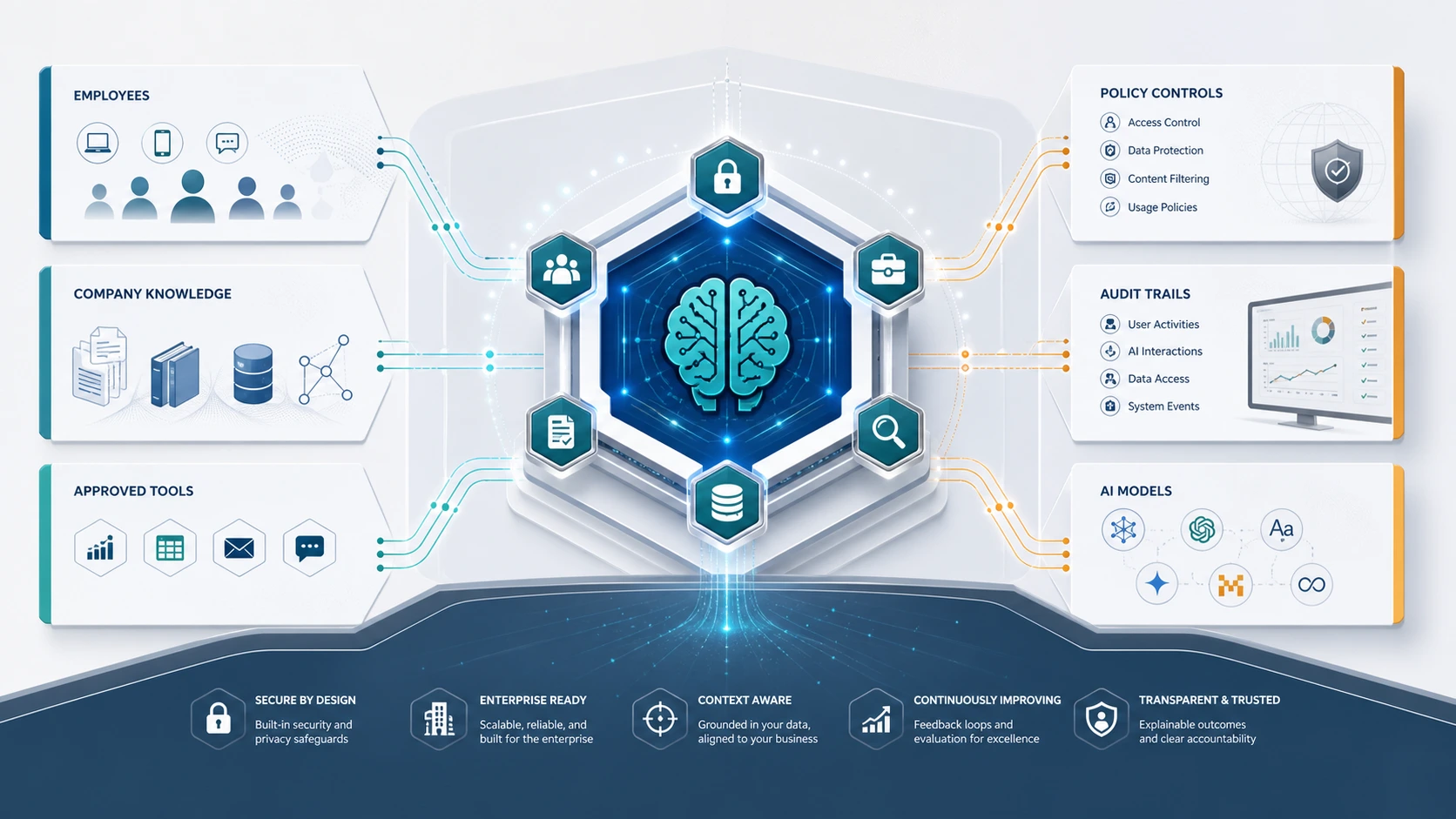
Enterprise AI copilots are moving from experiments to internal operating systems. The problem is that many companies still treat them like smarter chatbots: connect an LLM, add a search layer, put a chat box in front of employees, and call it a copilot.
That approach works for demos. It breaks in production.
An enterprise AI copilot needs more than a model. It needs secure context, permission-aware retrieval, model routing, tool access controls, workflow boundaries, human review, monitoring, cost visibility, and audit logs. Without those layers, a copilot can become another uncontrolled AI surface inside the business.
McKinsey's 2025 State of AI research reported that 88% of organizations surveyed already use AI in at least one business function, while only about one-third have begun scaling AI programs meaningfully across the enterprise. That gap is exactly why architecture matters: AI usage spreads faster than operating discipline. See McKinsey's State of AI for the current adoption picture.
Quick answer: what is enterprise AI copilot architecture?
Enterprise AI copilot architecture is the technical and operating design that lets an AI assistant work safely inside company workflows. It connects users, business applications, enterprise data, retrieval systems, models, tools, and governance controls. A production-ready architecture should manage identity, permissions, context, model choice, tool execution, cost, quality, audit logs, and human review.
A useful enterprise copilot is not just conversational. It is workflow-aware, context-aware, permission-aware, and operationally observable.
Why enterprise copilots need architecture, not just prompts
Most AI copilots begin with a simple internal question:
"Can we give employees a ChatGPT-like assistant for company knowledge and workflows?"
That usually leads to an early prototype:
- User asks a question.
- The system retrieves some internal documents.
- The LLM generates an answer.
- The user gets a response in a chat interface.
This is a good proof of concept. It is not yet enterprise architecture.
The real problems begin when the copilot needs to answer sensitive questions, access customer data, summarize contracts, update records, call APIs, create tickets, draft responses, or recommend business actions. At that point, the copilot is no longer just a chat interface. It is sitting inside the operating flow of the company.
That means the architecture must answer harder questions:
- Who is allowed to use the copilot?
- What data can each user access?
- Which model should handle each request?
- When should the copilot retrieve company context?
- When should it avoid sensitive data?
- Which tools can it call?
- What actions require human approval?
- How are outputs reviewed?
- How are cost, latency, quality, and failures monitored?
- What is logged for audit and troubleshooting?
This is where enterprise AI copilot architecture becomes an operating-layer problem.
AI copilot vs chatbot vs AI agent
The terms chatbot, copilot, and agent are often used interchangeably. That creates confusion during architecture planning.
| Type | What it does | Context level | Action level | Risk level |
|---|---|---|---|---|
| Chatbot | Answers questions through conversation | Low to medium | Usually none | Low to medium |
| AI copilot | Assists users inside workflows | Medium to high | Suggests, drafts, retrieves, prepares | Medium to high |
| AI agent | Plans and executes tasks with more autonomy | High | Can use tools and complete steps | High |
A chatbot is usually reactive. It answers what the user asks.
A copilot is more workflow-aware. It understands the task, the user's role, the active document, the customer record, the ticket, the report, or the business process.
An agent has more autonomy. It can plan steps, call tools, trigger workflows, or execute actions. Microsoft's current agents overview for Microsoft 365 Copilot is useful here because it shows how fast copilots move toward multi-step, integrated, agent-like behavior once tool access and workflow actions are introduced.
In practice, enterprise copilots often sit between chatbots and agents. They may start as assistants, then gain tool access over time. That is why the architecture should be designed for controlled expansion from day one.
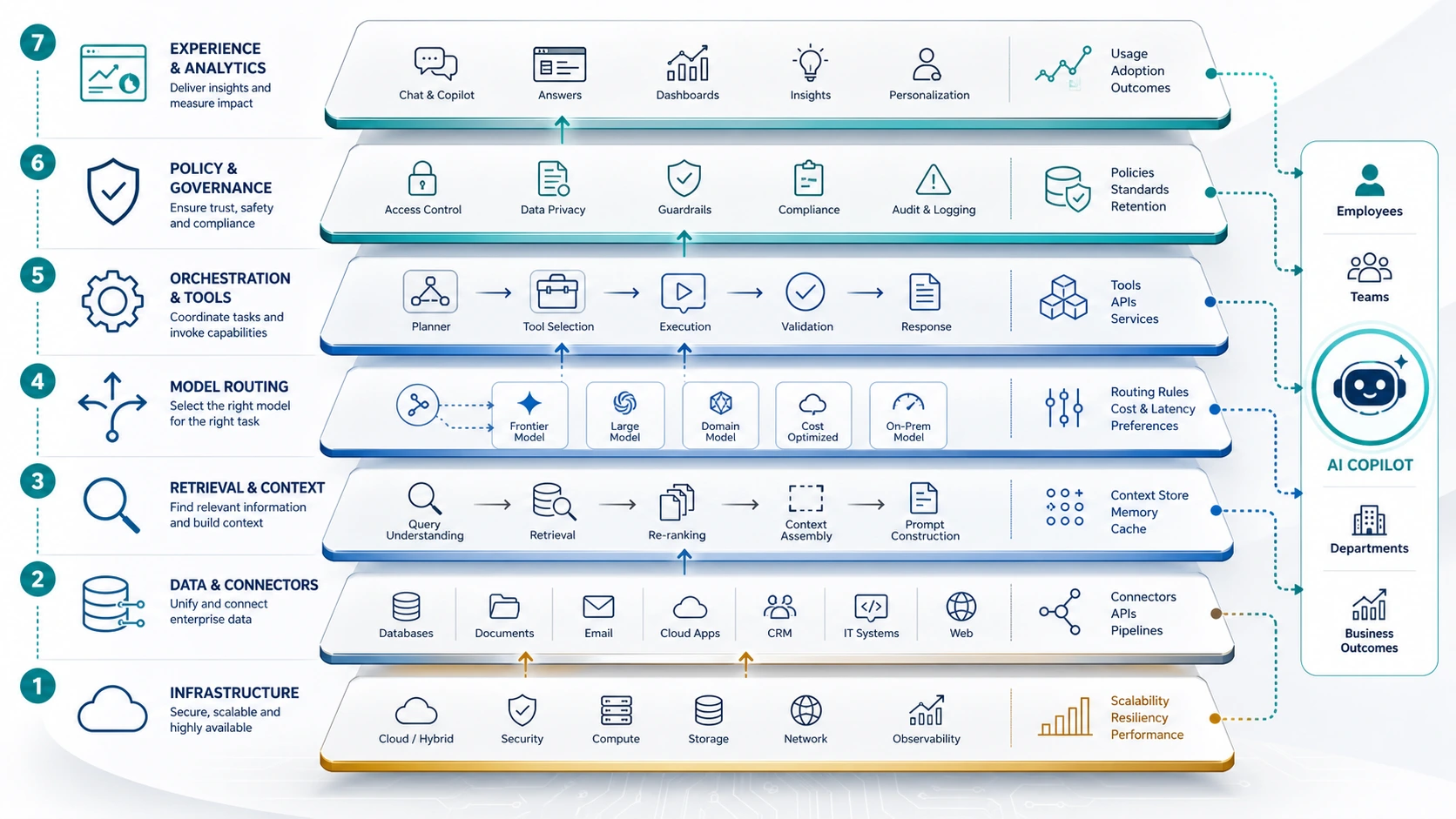
The seven layers of enterprise AI copilot architecture
A strong enterprise AI copilot usually needs seven layers:
- User and identity layer
- Workflow and interface layer
- Context and retrieval layer
- Model routing layer
- Tool and action layer
- Governance and policy layer
- Observability and operations layer
Each layer has a different job. If one is missing, the copilot may still work in a demo, but it becomes harder to trust at scale.
1. User and identity layer
The first architectural question is not "Which model should we use?"
It is: "Who is asking?"
Enterprise copilots must understand identity because users do not have equal access to company data or actions. A finance manager, support agent, HR partner, legal counsel, and executive may all use the same copilot interface, but they should not see the same context or trigger the same workflows.
The identity layer should support:
- SSO and enterprise identity provider integration
- Role-based or attribute-based access rules
- Department, geography, project, and system-level entitlements
- User-level audit records
- Session tracking
- Permission-aware retrieval and tool access
This is especially important for copilots connected to internal knowledge bases, CRMs, ERPs, HR systems, ticketing tools, document repositories, and data warehouses.
Microsoft's Copilot Studio governance guidance and security FAQ are useful external references because they explicitly tie governance and responses back to permissions, DLP controls, and admin policy.
A copilot that ignores identity can accidentally become a data-leakage layer.
2. Workflow and interface layer
A generic chat box is rarely enough for enterprise work.
Good copilots are embedded where decisions happen. That may be inside a CRM, helpdesk, internal portal, IDE, analytics dashboard, procurement workflow, HR system, or document review workspace.
The interface should match the workflow.
A support copilot may need suggested replies, policy citations, escalation recommendations, and next-best-action buttons.
A sales copilot may need account context, opportunity history, meeting summaries, email drafting, and CRM update suggestions.
A legal copilot may need document comparison, clause extraction, risk notes, and human approval before any output is used.
A finance copilot may need structured answers, source references, spreadsheet outputs, and strict permission controls.
The interface layer decides how much autonomy the copilot has. It should make clear whether the copilot is:
- answering,
- suggesting,
- drafting,
- recommending,
- preparing an action,
- or executing an approved action.
This distinction matters. Users should know when AI is helping them think and when it is about to touch a business system.
3. Context and retrieval layer
A copilot without enterprise context is just a general-purpose model with a company-branded UI.
Enterprise context usually comes from retrieval-augmented generation, or RAG. In simple terms, RAG combines retrieval systems with LLM generation so the model can answer from approved, relevant information instead of only its pretrained knowledge. Google's RAG explainer is a clean reference for that baseline definition.
But enterprise RAG is not just search plus LLM.
The context layer should handle:
- approved data sources,
- document ingestion,
- chunking strategy,
- metadata,
- permission filtering,
- vector search,
- hybrid search,
- reranking,
- context window management,
- citation generation,
- freshness checks,
- PII or sensitive-data controls,
- and source-quality evaluation.
The most common failure is over-retrieval. Teams pass too much context into the model, increase cost, slow the response, and still get weak answers. The second failure is unsafe retrieval, where the system fetches documents the user should not have access to.
A production copilot should retrieve only the context that is relevant, allowed, current, and useful. If the copilot needs deeper knowledge architecture, the nearest companion piece is the Enterprise RAG Implementation Guide.
4. Model routing layer
Many enterprise copilots are built around one default model. That is simple, but it is rarely efficient.
Different tasks have different model requirements. A simple classification task may not need a frontier model. A complex reasoning task may justify one. A sensitive workflow may require a private or controlled deployment path. A high-volume summarization workflow may need a lower-cost model with acceptable quality.
Model routing helps decide which model or model path should handle each request.
Routing can consider:
- task complexity,
- data sensitivity,
- required accuracy,
- latency tolerance,
- cost budget,
- context length,
- language requirements,
- compliance requirements,
- fallback needs,
- and model availability.
Examples:
| Request type | Better routing decision |
|---|---|
| Summarize low-risk internal notes | Lower-cost model or cached workflow |
| Analyze sensitive HR records | Private or tightly governed model path |
| Draft executive strategy from multiple sources | Frontier model with reviewed context |
| Answer policy question from internal docs | RAG-backed model with source citations |
| Generate structured ticket tags | Small model or rules-based classifier |
| Execute workflow action | Model plus tool policy and human approval |
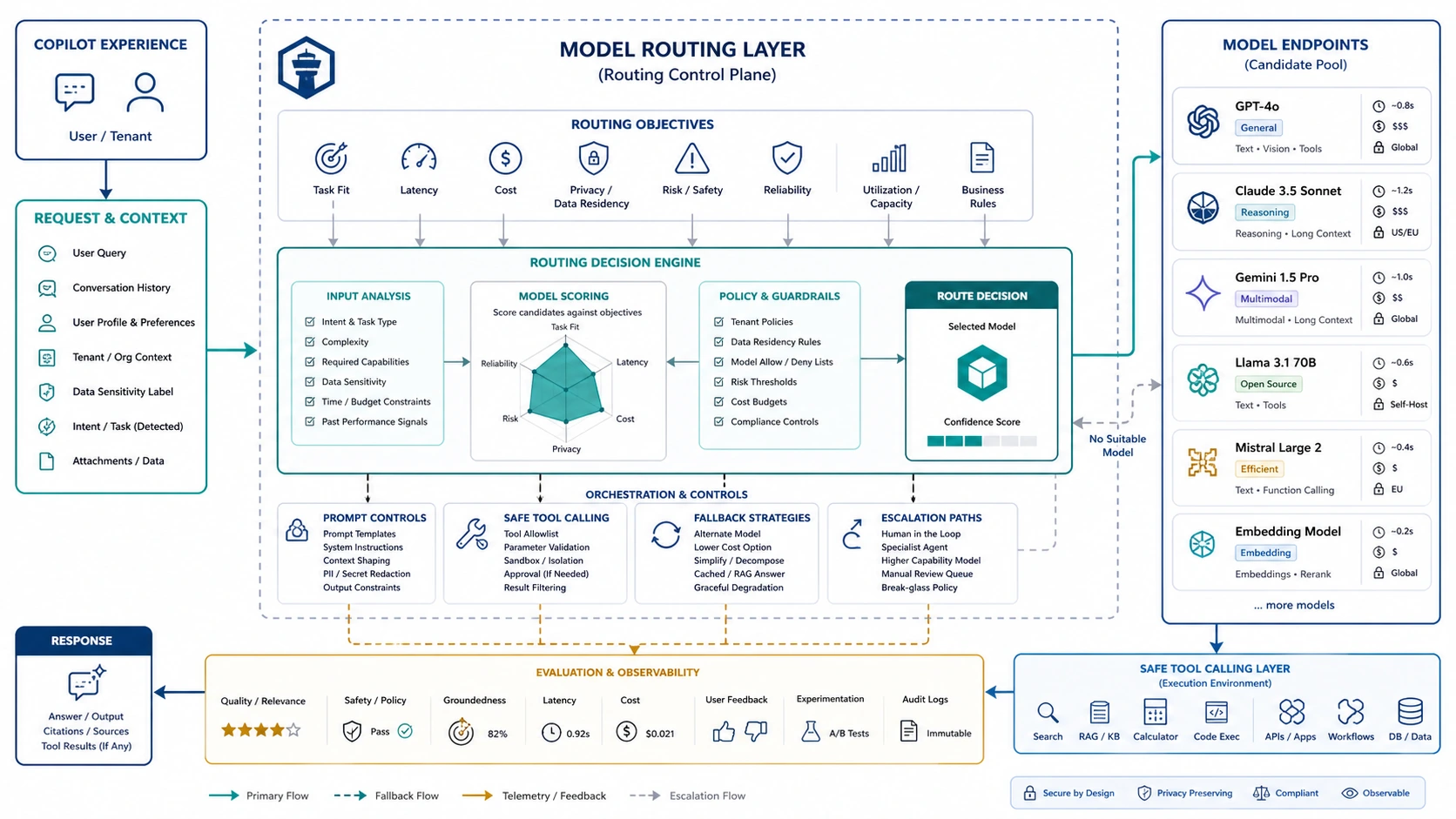
This is one of the most important differences between a copilot demo and a scalable operating system. The question is not "Which model is best?" The question is "Which model is right for this workload, under these constraints?"
That is also where structured evaluation matters. The right follow-on surface is a Model Benchmarking Assessment, because routing decisions should be based on workload evidence rather than vendor preference alone.
5. Tool and action layer
A copilot becomes more powerful when it can use tools.
It also becomes riskier.
Tool access can include:
- creating tickets,
- updating CRM records,
- sending emails,
- querying databases,
- changing workflow status,
- creating reports,
- triggering automations,
- opening support cases,
- or calling internal APIs.
Every tool should have a clear permission model. The copilot should not receive broad access simply because the user has broad access. AI systems need narrower boundaries because they can misunderstand instructions, overgeneralize, or be manipulated through prompt injection.
The tool layer should define:
- which tools are available,
- which users can access each tool,
- which actions require approval,
- what parameters are allowed,
- what outputs must be validated,
- when the system should refuse,
- and what gets logged.
A useful design pattern is progressive autonomy:
- Read-only answers.
- Draft suggestions.
- Prepared actions requiring user approval.
- Limited execution for low-risk tasks.
- Higher-risk execution only with policy controls and review.
Do not give an enterprise copilot full action rights too early. Start with observe and advise before execute.
6. Governance and policy layer
Governance should not be a slide deck after the copilot launches. It should be part of the architecture.
The governance layer defines what the copilot can and cannot do across users, data, models, tools, and workflows.
It should include:
- usage policies,
- data handling rules,
- sensitive-data restrictions,
- model selection rules,
- retention policies,
- human review requirements,
- approval workflows,
- escalation paths,
- risk classification,
- incident response,
- and audit requirements.
This is where external frameworks matter. The NIST AI Risk Management Framework is useful because it frames trustworthy AI risk across design, development, deployment, use, and evaluation. The OWASP Top 10 for LLM Applications is equally useful because it brings concrete application-layer risks into the picture, including prompt injection, insecure output handling, sensitive information disclosure, insecure plugin use, excessive agency, and overreliance.
This is especially important as copilots move closer to agentic behavior. A low-risk knowledge assistant and a workflow-executing AI agent should not have the same governance model.
That point is reinforced by Gartner's 2026 press guidance on AI agents: governance should vary with autonomy and access scope instead of being applied uniformly. Deloitte's current agentic AI analysis makes a similar point from a maturity angle: deployment is accelerating faster than guardrails in many organizations. See Gartner's press release and Deloitte's agentic AI analysis.
The governance model should be proportional to autonomy and access.
A read-only policy assistant needs lightweight controls. A copilot that can update financial data, send customer messages, or approve workflow steps needs stricter controls.
7. Observability and operations layer
Enterprise copilots do not end at launch.
Models change. Prompts drift. Retrieval quality changes as documents change. Costs rise as adoption grows. User behavior evolves. New failure modes appear when the copilot touches real work.
The operations layer should monitor:
- usage by team and workflow,
- cost per request,
- token and context usage,
- latency,
- error rates,
- retrieval quality,
- answer quality,
- citation quality,
- escalation rate,
- human override rate,
- blocked requests,
- tool-call success,
- user feedback,
- and policy violations.
A copilot should also have operating reviews. Monthly or quarterly review cycles help teams decide which workflows should be expanded, which should be restricted, which models should be replaced, and where cost or quality needs tuning.
The companies that win with enterprise copilots will not be the ones with the most AI interfaces. They will be the ones that know how each AI workflow is performing. That is where Managed AI Operations and the broader AI Operating Efficiency Capabilities become more relevant than one-off launch work.
Reference architecture: enterprise AI copilot operating layer
A practical enterprise AI copilot architecture looks like this:
- User enters through an approved interface.
- Identity and role are verified.
- The request is classified by task type, sensitivity, and intent.
- Policy determines whether the request is allowed, blocked, limited, or escalated.
- The context layer retrieves only approved information.
- The routing layer selects the right model or deployment path.
- The model generates an answer, draft, recommendation, or action plan.
- Output validation checks format, policy, safety, and confidence.
- Tool access is allowed only where policy permits it.
- Human approval is required for high-risk actions.
- Logs capture request, context, model path, policy decision, output, tool call, cost, and user feedback.
- Operations teams review performance and tune the system over time.
This is the shift from AI assistant to AI operating layer.
Enterprise AI copilot use cases
Internal knowledge copilot
Helps employees search policies, procedures, product docs, project history, sales collateral, and technical documentation.
Architecture priority: permission-aware RAG, source citations, freshness, user feedback.
Customer support copilot
Helps agents draft responses, summarize tickets, find policy answers, recommend escalation, and update support systems.
Architecture priority: CRM or helpdesk integration, answer grounding, tone control, escalation logic, human approval.
Sales copilot
Helps sales teams prepare for calls, summarize accounts, draft follow-ups, identify next steps, and update CRM fields.
Architecture priority: CRM context, account permissions, email review, structured outputs, workflow fit.
Legal or compliance copilot
Helps review contracts, compare clauses, summarize obligations, and flag risk.
Architecture priority: strict access control, document traceability, human review, privacy, audit logs.
Engineering copilot
Helps developers understand code, generate documentation, review changes, and answer architecture questions.
Architecture priority: repository context, coding standards, secure code review, permission boundaries.
Operations copilot
Helps teams analyze incidents, retrieve SOPs, recommend next actions, and create reports.
Architecture priority: system integrations, incident context, escalation paths, tool safety, observability.
Architecture decision framework
Use this framework before building an enterprise copilot.
| Question | Why it matters |
|---|---|
| What workflow will the copilot support? | Avoids building a generic assistant with unclear value |
| Who will use it? | Determines access, interface, training, and adoption plan |
| What data does it need? | Determines retrieval, permissions, privacy, and integration design |
| What actions can it take? | Determines tool access and approval paths |
| Which tasks require human review? | Prevents unsafe automation |
| Which model paths are acceptable? | Balances cost, quality, latency, and privacy |
| What needs to be logged? | Supports audit, monitoring, troubleshooting, and governance |
| How will success be measured? | Connects the copilot to business value |
If these questions are unanswered, the company is not ready to scale the copilot.
Common architecture mistakes
Mistake 1: Starting with the model instead of the workflow
A powerful model cannot fix an unclear workflow. Start with the business task, user role, decision point, data source, and review requirement.
Mistake 2: Treating RAG as a complete governance system
RAG can ground answers, but it does not automatically solve permissions, freshness, source quality, or sensitive-data handling.
Mistake 3: Giving the copilot too many tools too early
Tool use should expand gradually. Start with read-only assistance, then move to drafts and prepared actions before execution.
Mistake 4: Using one model for every task
This creates unnecessary cost and can weaken privacy or latency outcomes. Route based on workload requirements.
Mistake 5: Ignoring cost until adoption grows
AI costs often look manageable during pilots. They become harder to control when usage expands across teams and workflows. This is part of the broader implementation gap covered in Enterprise AI ROI Calculation.
Mistake 6: No audit trail
If a copilot influences business decisions, the company should know who used it, what data was retrieved, which model was used, what output was produced, and whether a tool was called.
Mistake 7: No post-launch owner
Enterprise copilots need ongoing ownership. Someone must monitor quality, cost, risk, user feedback, model changes, and adoption patterns.
What to measure after launch
A copilot should be measured like an operating system, not a one-time software feature.
Important metrics include:
| Metric | What it tells you |
|---|---|
| Adoption by workflow | Whether users actually find it useful |
| Task completion rate | Whether the copilot helps finish work |
| Human override rate | Whether users trust or reject outputs |
| Escalation rate | Whether the copilot knows its limits |
| Retrieval precision | Whether it finds the right sources |
| Citation quality | Whether users can verify answers |
| Cost per completed task | Whether AI spend maps to business value |
| Latency | Whether response time fits the workflow |
| Policy violations | Whether governance is working |
| Tool-call failure rate | Whether integrations are reliable |
| User satisfaction | Whether the experience fits real work |
The goal is not just to launch a copilot. The goal is to operate it well.
Where an AI control plane fits
As copilots spread, the architecture starts to need a control plane.
An AI control plane is the governed layer between users, applications, agents, models, tools, and enterprise data. It helps classify requests, enforce access rules, route workloads, manage context, control cost, and create audit visibility.
This matters because enterprise AI adoption usually becomes fragmented. Different teams choose different models, tools, prompts, workflows, and integrations. Without a control layer, the company may not know where sensitive data is going, which models are being used, what costs are rising, or which outputs are being trusted.
A control plane gives leadership and technical teams a shared operating surface. If the choice is still open between building everything custom or operating through a governed layer, compare this architecture to Custom AI vs Off-the-Shelf AI.
Where AgenixCore fits
AgenixCore is built for this exact operating-layer problem.
For enterprise AI copilots, AgenixCore should sit between users, applications, agents, models, tools, and enterprise data. Its role is to help govern access, route requests, assemble secure context, control spend, and capture audit-ready activity across AI workflows.
In a copilot architecture, AgenixCore maps to five critical layers:
- Access governance: who can use which AI capability.
- Model routing: which model or deployment path should handle the task.
- Secure context: what data can be retrieved and passed into the model.
- Cost controls: how usage, tokens, budgets, caching, and limits are managed.
- Audit logs: what happened, which policy applied, and what path was used.
This is the difference between launching a copilot and operating one.
How AgenixHub helps
AgenixHub helps companies move from uncontrolled AI usage to managed AI operations.
For enterprise AI copilots, the work usually starts with an AI Operating Efficiency Audit. The goal is to understand where AI is already being used, which workflows need copilot support, where sensitive data is involved, where model choice matters, and where cost or governance gaps may appear.
From there, AgenixHub can help design the operating layer:
- classify AI workloads,
- map user roles and access paths,
- define model routing logic,
- improve RAG and context efficiency,
- benchmark models against real workflows,
- govern sensitive work,
- design approval and review paths,
- and operate the system over time.
The product anchor for that architecture is AgenixCore. The service layer around it includes the Managed AI Efficiency Layer, Managed AI Operations, Model Benchmarking Assessment, and Inward Deployed AI Engineers.
Not every workflow needs AI. Not every AI workflow needs a frontier model. Not every sensitive workflow must be fully on-prem. The right answer comes from operating discipline, not assumptions.
Enterprise AI copilot architecture checklist
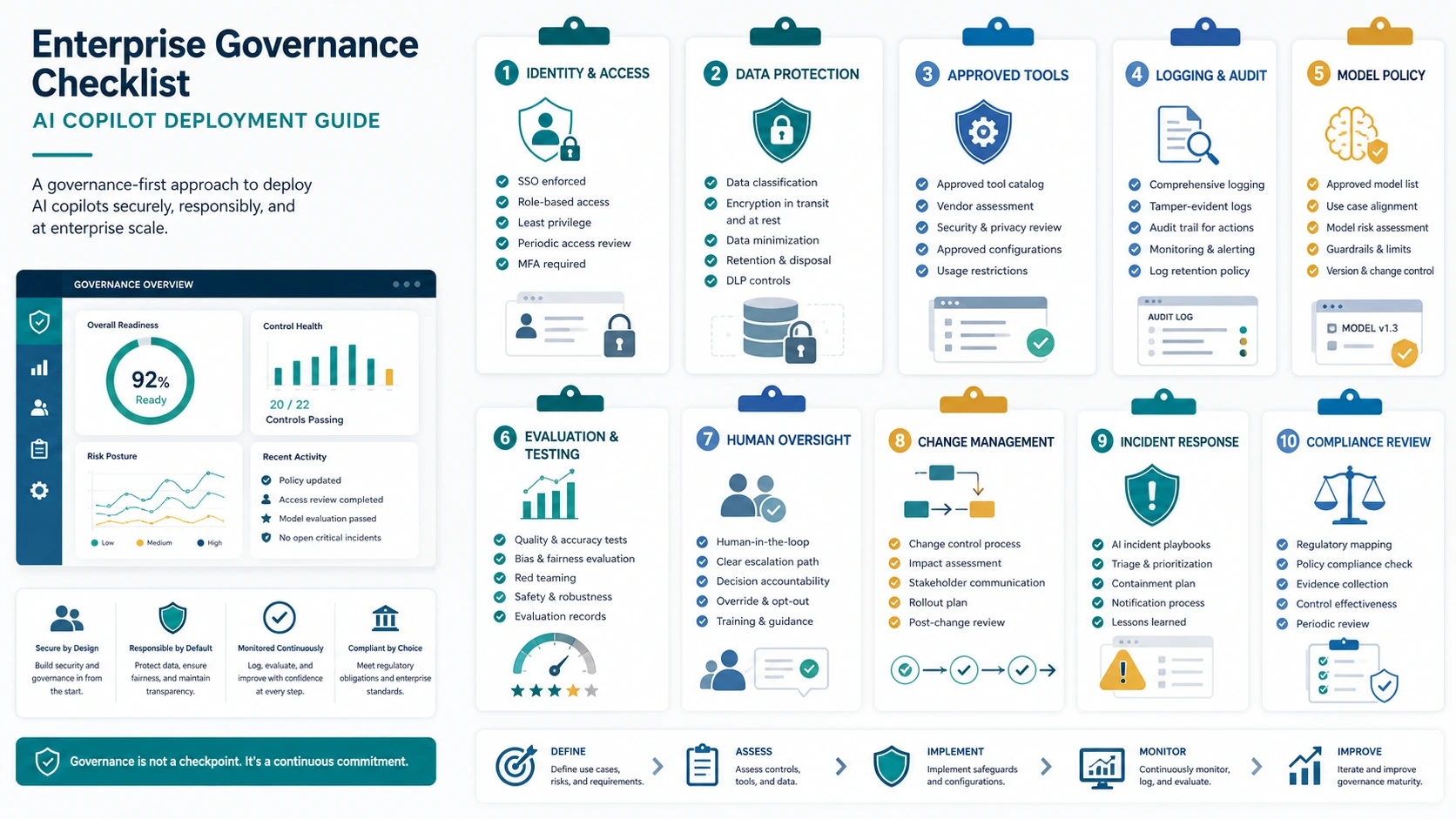
Before scaling an enterprise copilot, confirm these decisions:
- The primary workflow is clearly defined.
- The target user roles are identified.
- The business value is measurable.
- Data sources are approved and governed.
- Retrieval respects user permissions.
- Sensitive-data rules are defined.
- Model routing rules are documented.
- Tool access is scoped.
- Human approval is required for high-risk actions.
- Outputs are validated where needed.
- Usage, cost, latency, and quality are monitored.
- Audit logs are captured.
- Ownership after launch is assigned.
- Review cycles are scheduled.
- Failure and escalation paths are clear.
If this checklist feels heavy, that is the point. Enterprise copilots touch real workflows. Real workflows need operating control.
FAQ
What is enterprise AI copilot architecture?
Enterprise AI copilot architecture is the design that lets an AI assistant work safely inside business workflows. It includes identity, interface, retrieval, model routing, tool access, governance, observability, human review, and audit logs.
How is an AI copilot different from a chatbot?
A chatbot usually answers questions through conversation. An AI copilot is workflow-aware. It assists users inside a task, such as drafting a response, analyzing a document, preparing a CRM update, or retrieving approved business context.
How is an AI copilot different from an AI agent?
A copilot usually assists and suggests while the user remains in control. An AI agent has more autonomy and may plan steps, use tools, and execute actions. Many enterprise copilots gradually become more agentic, which is why governance should be built early.
Does every enterprise copilot need RAG?
Not every copilot needs RAG, but most enterprise copilots need some form of approved business context. RAG is useful when the copilot must answer from company documents, policies, tickets, contracts, product data, or knowledge bases.
Why does model routing matter for AI copilots?
Model routing helps match each request to the right model or deployment path based on cost, quality, latency, privacy, and task complexity. This prevents companies from using expensive frontier models for every task or exposing sensitive workflows to the wrong path.
What are the biggest risks in enterprise AI copilot architecture?
Common risks include data leakage, weak permission filtering, hallucinated answers, unsafe tool use, excessive autonomy, cost overruns, poor auditability, and overreliance on AI outputs without human review.
When does a company need an AI control plane?
A company needs an AI control plane when AI usage spreads across teams, tools, models, agents, and workflows, and leadership needs consistent governance, routing, cost visibility, secure context, and audit logs.
Where does AgenixCore fit in enterprise AI copilot architecture?
AgenixCore fits as the governed operating layer between users, applications, AI agents, models, tools, and enterprise data. It helps manage access, routing, context, cost controls, and audit visibility for enterprise AI workflows.
Conclusion
Enterprise AI copilots are not just user interfaces for large language models. They are operating surfaces for company knowledge, decisions, and workflows.
That makes architecture the difference between a useful internal assistant and another unmanaged AI risk.
A strong enterprise AI copilot needs identity, secure context, model routing, tool permissions, governance, observability, and human review. It should start narrow, prove value, expand responsibly, and operate continuously.
AgenixCore exists for this shift: from scattered AI adoption to governed AI operations.
If your company is planning an internal copilot, start with the operating layer before the interface spreads. Explore AgenixCore or book an AI Operating Efficiency Audit.