
Enterprise teams rarely fail at AI because they picked one wrong tool.
They fail because every team starts picking tools independently.
One team buys a chatbot. Another team experiments with a coding assistant. A third team connects internal documents to an LLM. Finance starts testing invoice extraction. Marketing gets its own content tools. Engineering experiments with agents. Security later discovers that no one has a shared view of data access, model usage, cost, quality, or risk.
That is why the old question — custom AI vs off-the-shelf AI — is useful, but incomplete.
The better question is:
Which AI workloads should we buy, which should we build, which should we customize, and which should run through a governed operating layer?
AI adoption is already widespread. McKinsey’s 2025 State of AI survey found that 88% of respondents report regular AI use in at least one business function, while only about one-third say their companies have begun scaling AI programs across the enterprise (McKinsey — State of AI: Global Survey 2025).
That gap matters. Buying more AI tools does not automatically create an AI operating model.
Quick answer: custom AI vs off-the-shelf AI
Off-the-shelf AI is best for common, low-risk workflows where speed, vendor support, and fast deployment matter more than deep customization. Custom AI is better when the workflow is strategically important, data-sensitive, complex, regulated, or tightly connected to proprietary business logic. Most enterprises need a hybrid approach: buy where speed matters, build where differentiation matters, and operate everything through governance, benchmarking, routing, and monitoring.
What is off-the-shelf AI?
Off-the-shelf AI refers to ready-made AI tools, platforms, model APIs, copilots, chatbots, automation software, analytics tools, or AI features inside existing SaaS products.
Examples include:
- AI chatbots for customer support.
- AI writing assistants.
- Document summarization tools.
- CRM or helpdesk AI features.
- Coding assistants.
- Meeting note tools.
- Prebuilt invoice or document extraction systems.
- General-purpose LLM APIs.
- Enterprise copilots.
The strength of off-the-shelf AI is speed. A team can often start using it in days or weeks.
The weakness is fit. Most off-the-shelf tools are designed for broad categories of users, not your exact process, data model, permissions, quality thresholds, compliance obligations, or operating cost constraints.
That does not make them bad. It means they should be used where their tradeoffs are acceptable.
What is custom AI?
Custom AI refers to AI systems designed around a company’s own workflows, data, rules, integrations, review steps, and business goals.
That does not always mean training a frontier model from scratch.
Custom AI can include:
- A private RAG system over internal documents.
- Workflow-specific AI agents.
- Fine-tuned or adapted models.
- Custom prompt and context pipelines.
- Model routing between frontier, commercial, and open models.
- Domain-specific evaluation sets.
- Custom approval and review flows.
- AI integrated into internal tools, CRMs, ERPs, data warehouses, or support systems.
- Private or on-prem model paths for sensitive workloads.
Custom AI is useful when generic tools cannot reliably handle the workflow or when the workflow is important enough to justify deeper control.
But custom AI is not magic. It can take longer, cost more upfront, and require ongoing monitoring, maintenance, evaluation, and governance.
The real enterprise choice: buy, build, configure, or operate
Most comparison articles reduce the decision to two options:
- Buy a ready-made AI tool.
- Build a custom AI solution.
That is too simple for enterprise AI.
A better framework has four paths:
| Path | Best for | Main risk | Implementation Speed | Initial Investment |
|---|---|---|---|---|
| Buy | Common, low-risk, standardized workflows | Tool sprawl, vendor lock-in, poor workflow fit | Days to weeks | Low |
| Build | Differentiating or sensitive workflows | Cost, timeline, maintenance burden | Months | High |
| Configure | Workflows where an existing tool works but needs adaptation | Hidden limits, shallow customization | Weeks to months | Medium |
| Operate | Multi-tool, multi-model, enterprise-wide AI usage | Requires governance, ownership, and measurement | Continuous | Ongoing |
The fourth path is where many enterprises are underinvested.
They buy tools and build pilots, but they do not create a layer to govern usage, route workloads, monitor quality, control cost, protect sensitive data, and continuously improve performance.
That is where an AI operating layer becomes important.

When off-the-shelf AI makes sense
Off-the-shelf AI is a good starting point when the workflow is common, the risk is low, and the cost of delay is higher than the cost of imperfect fit.
Use off-the-shelf AI when:
- The task is not a source of competitive advantage.
- The workflow is common across many companies.
- The data is not highly sensitive.
- The required accuracy threshold is moderate.
- The tool already integrates with your systems.
- Vendor support, uptime, and security are acceptable.
- You need to validate demand before investing in custom development.
- Human review can catch mistakes without creating heavy rework.
Examples:
- Meeting summaries.
- Internal drafting.
- First-pass content generation.
- Basic support triage.
- Standard FAQ chatbots.
- Low-risk document summarization.
- Simple analytics assistance.
- Sales note cleanup.
- Generic coding assistance.
For these use cases, building from scratch can be wasteful. The goal should be fast adoption, clear usage policy, and measurement.
When off-the-shelf AI becomes expensive
Off-the-shelf AI often looks cheaper at the start because the visible cost is subscription pricing.
The hidden cost appears later.
Common hidden costs include:
- Employees correcting poor outputs.
- Teams creating manual workarounds.
- Engineering time spent on integration.
- Multiple teams paying for overlapping tools.
- Sensitive data being routed through tools without policy review.
- Output quality varying across departments.
- No central visibility into usage or spend.
- Vendor pricing changing after adoption.
- Inability to customize core workflows.
- Business logic living outside the tool.
This is not just a software cost problem. It is an operating problem.
The question is not, “Is this tool cheap?”
The question is:
What does this tool cost after integration, review, governance, rework, security, training, adoption, and monitoring?
When custom AI makes sense
Custom AI is usually worth considering when the workflow is important, unique, sensitive, or tightly connected to the company’s operating advantage.
Use custom AI when:
- The workflow is core to how the company wins.
- The company has proprietary data that improves performance.
- The process has complex business rules.
- Generic tools produce too much rework.
- Sensitive data or regulated workflows require stricter control.
- Existing systems are too unique for standard connectors.
- The company needs ownership over the workflow, evaluation, or deployment path.
- The AI system must integrate deeply into internal operations.
- The model path needs to be private, on-prem, VPC-based, or otherwise controlled.
- The use case will scale enough to justify deeper investment.
Examples:
- Financial document review with internal approval logic.
- Insurance claims triage using proprietary policy rules.
- Enterprise knowledge search with permission-aware retrieval.
- Healthcare workflow assistance with PHI boundaries.
- Manufacturing quality inspection using company-specific defect data.
- Legal contract review with organization-specific playbooks.
- Customer support automation grounded in internal product, policy, and account data.
Custom AI is strongest when the company has context that generic tools cannot understand.
But custom AI does not always mean “build everything”
A common mistake is assuming custom AI means building the entire stack from zero.
In reality, most strong enterprise AI systems are assembled from multiple layers:
- Commercial frontier models for complex reasoning.
- Open or private models for cost-sensitive or sensitive workloads.
- RAG systems for enterprise knowledge.
- Workflow orchestration for actions.
- Human review for high-risk decisions.
- Monitoring for quality, cost, and latency.
- Governance controls for access, policy, and audit.
- Evaluation sets for workload-specific performance.
- Model routing to choose the right path per task.
That is why the build-vs-buy question is incomplete.
A company may buy model access, build workflow logic, configure retrieval, operate governance centrally, and benchmark all of it continuously.
The hybrid AI model most enterprises actually need
Hybrid AI is not just “some custom and some prebuilt.”
A serious hybrid AI model means the enterprise can decide workload by workload:
| Workload type | Better default path | Example implementation |
|---|---|---|
| Generic drafting | Off-the-shelf tool or standard model API | Standard writing assistant |
| Internal knowledge search | RAG with governed access | Permission-aware internal RAG |
| Sensitive data review | Private, VPC, or on-prem model path | Secure server-side validation |
| Complex reasoning | Frontier model with controls | Underwritten analysis checks |
| High-volume routine work | Smaller model or optimized open/private model | Categorization and tagging pipelines |
| Customer-facing automation | Controlled workflow with monitoring and escalation | Support chat drafts with agent approval |
| Regulated decision support | Human-in-the-loop system with audit trail | Document compliance checks |
| Agentic workflow | Tool access, policy controls, logging, and approval gates | Autonomous scheduling and search |
The winning strategy is usually not one tool.
It is a routing strategy.
The enterprise AI operating layer
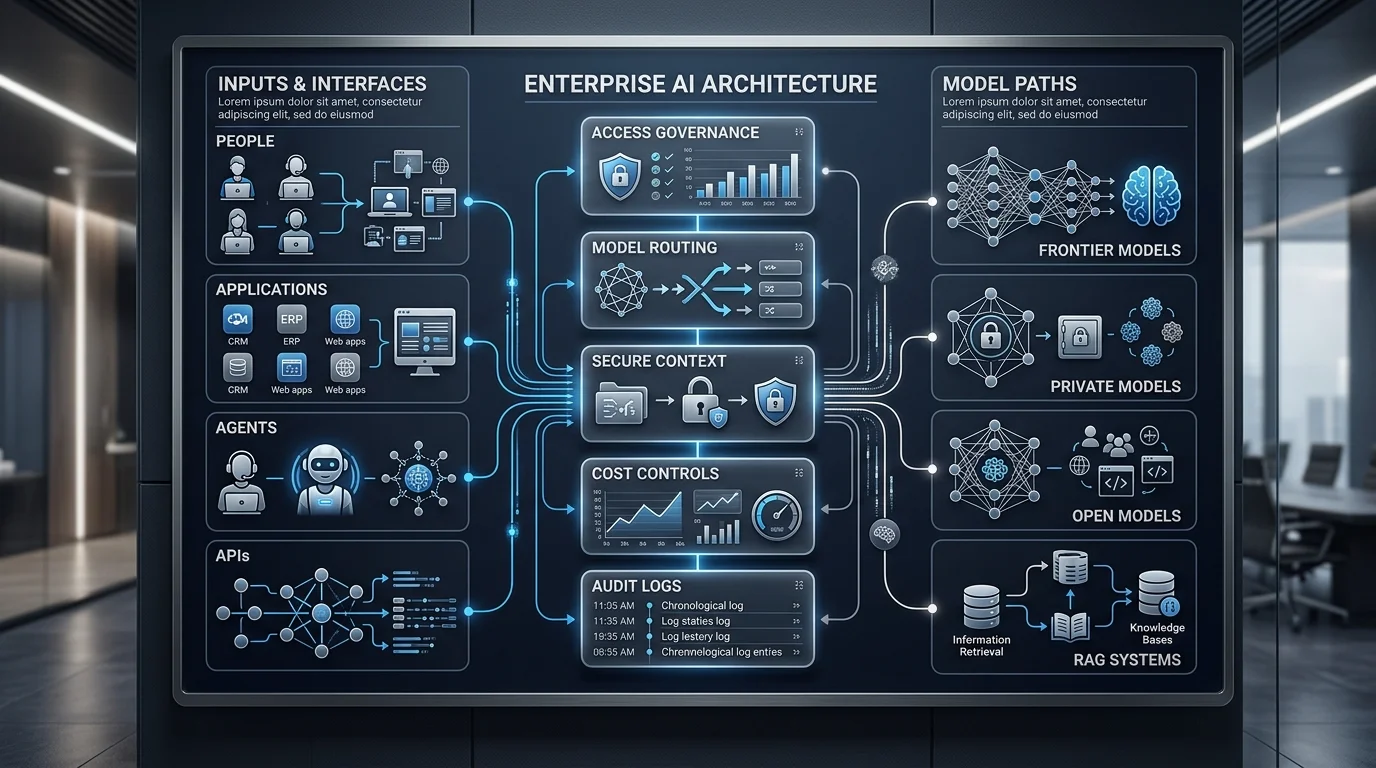
An AI operating layer sits between users, applications, models, data, tools, and governance policies.
Its job is to answer questions like:
- Who is allowed to use which AI capability?
- Which data can be used for which workflow?
- Which model should handle this task?
- Should this request go to a frontier model, private model, open model, or RAG path?
- What is the expected cost?
- What is the acceptable latency?
- Does the response need human review?
- Is sensitive data involved?
- Is the output being logged?
- Can the company audit what happened later?
This is where custom AI and off-the-shelf AI stop being enemies.
A company can use off-the-shelf tools where they fit, custom systems where they matter, and a governed operating layer to keep the entire AI estate controlled.
NIST’s AI Risk Management Framework emphasizes that organizations need structured ways to map, measure, manage, and govern AI risks across the AI lifecycle (NIST — AI Risk Management Framework: Generative AI Profile).
That is exactly why enterprise AI needs operating discipline, not just tool selection.
Custom AI vs off-the-shelf AI decision matrix
Use this matrix before choosing a tool, vendor, or custom build.
| Question | If yes | If no |
|---|---|---|
| Is the workflow common and low-risk? | Start with off-the-shelf AI | Evaluate custom or hybrid |
| Does the workflow use sensitive data? | Require governance, private path, or controlled deployment | Standard vendor tools may be acceptable |
| Is the workflow core to competitive advantage? | Consider custom AI or custom workflow layer | Avoid overbuilding |
| Does output quality need to be high and consistent? | Model Benchmarking Assessment before scaling | Use lower-cost paths with review |
| Does the workflow need internal system access? | Design integration and permission controls | Use standalone tool if enough |
| Will usage scale across teams? | Add monitoring, cost controls, and routing | Pilot with lighter setup |
| Are multiple teams buying overlapping tools? | Run an AI Operating Efficiency Audit | Continue local experimentation |
| Does model choice affect cost or privacy? | Use model benchmarking and routing | Standardize only if constraints are simple |
Total cost of ownership: what to calculate
Do not compare custom AI and off-the-shelf AI only by upfront cost.
Compare total cost of ownership.
A practical AI TCO model includes:
| Cost area | What to measure |
|---|---|
| Subscription or API cost | License fees, token usage, model calls, seat pricing |
| Integration cost | Connectors, APIs, identity, workflow changes |
| Data preparation | Cleaning, labeling, document structuring, metadata |
| Review cost | Human time spent checking, correcting, approving |
| Failure cost | Wrong answers, customer impact, compliance exposure |
| Governance cost | Access control, policies, audit logs, risk reviews |
| Maintenance cost | Model updates, prompt changes, retrieval tuning |
| Switching cost | Vendor lock-in, data export, retraining, workflow migration |
| Opportunity cost | Time spent operating weak-fit tools instead of solving the core workflow |
For some workflows, off-the-shelf AI will win.
For others, custom AI will win.
For many, the answer will be:
Use the best model path for the workload, then govern it through a shared operating layer.
Data privacy: off-the-shelf does not automatically mean unsafe
A serious comparison should avoid lazy claims.
Off-the-shelf AI is not automatically insecure. Many enterprise AI providers now make explicit commitments around data privacy and model training.
OpenAI says it does not use business data to train models by default unless customers explicitly opt in (OpenAI — Enterprise privacy).
Microsoft states that training data uploaded for Azure fine-tuning is not used to train generative AI foundation models without customer permission or instruction (Microsoft — Azure OpenAI data privacy).
AWS says Amazon Bedrock and third-party model providers do not use customer inputs or outputs to train Amazon Nova, Amazon Titan, or third-party models (AWS — Amazon Bedrock FAQs).
Anthropic says it does not use inputs or outputs from its commercial products, such as Claude for Work and the Anthropic API, to train models by default (Anthropic Privacy Center).
So the real question is not only:
“Will the vendor train on our data?”
The better questions are:
- Where is the data processed?
- Where is it stored?
- Who can access logs?
- What metadata is retained?
- Can prompts contain sensitive data?
- Can the company enforce access controls?
- Are outputs auditable?
- Can the workflow meet internal security and compliance requirements?
- Can the company route sensitive work differently from routine work?
For many enterprises, the right answer is not full avoidance of commercial AI. It is controlled usage.
Model choice should happen by workload
One of the biggest AI cost mistakes is using the same model path for every task.
A simple internal summarization task may not need a frontier model.
A complex legal reasoning task may need one.
A sensitive HR workflow may need a private or controlled path.
A high-volume classification workflow may be better served by a smaller model, cached pipeline, or optimized open model.
That is why model benchmarking matters.
Before a company standardizes on custom AI, off-the-shelf AI, or a hybrid stack, it should test real workloads against real requirements:
- Quality.
- Cost per task.
- Latency.
- Privacy requirements.
- Integration needs.
- Human review effort.
- Failure severity.
- Scale potential.
This is where AgenixHub’s Model Benchmarking Assessment fits naturally: it compares model paths by workload fit, cost, quality, latency, privacy, and deployment route.
Where AgenixCore fits
AgenixCore is relevant when a company has moved beyond isolated AI pilots and needs a governed way to operate AI across teams, tools, models, and data sources.
AgenixCore is positioned as AgenixHub’s AI control plane for private, governed, cost-efficient enterprise AI. It sits between people, models, tools, and data sources to govern access, route requests, control cost, and capture interactions.
That makes it especially relevant when:
- Multiple teams are using different AI tools.
- Sensitive data needs stronger routing and access controls.
- Model choice affects cost, latency, or privacy.
- AI usage needs auditability.
- The company wants to avoid unnecessary frontier-model dependency.
- RAG systems need permission-aware context.
- AI agents need policy controls.
- Leadership wants visibility into AI adoption and value.
AgenixCore does not mean every workflow should become custom.
It means the company can make better decisions about which workloads should use off-the-shelf tools, custom workflows, private models, frontier models, RAG systems, or hybrid routes.
How AgenixHub helps
AgenixHub’s role is not to tell every company to build custom AI.
The role is to help companies make better operating decisions.
A practical engagement usually follows this motion:
1. Audit
Start with an AI Operating Efficiency Audit.
Map where AI is already being used, where waste is appearing, where sensitive work is happening, where model routing is weak, and where spend lacks attribution.
2. Benchmark
Run workload-level testing through a Model Benchmarking Assessment.
Compare frontier, commercial, private, open, and hybrid paths based on actual work, not vendor demos.
3. Design the operating layer
Use the Managed AI Efficiency Layer to classify AI workloads, route model calls, improve prompt/RAG efficiency, govern sensitive work, and monitor cost, quality, latency, privacy, and adoption.
4. Operate and improve
AI does not stay optimized by itself.
Models change. Costs change. Vendor capabilities change. Internal data changes. User behavior changes.
AgenixHub’s Inward Deployed AI Engineers are positioned around improving orchestration, reducing unnecessary frontier-model dependency, deploying private/open models where suitable, and keeping systems efficient, secure, and measurable.
Practical examples
Example 1: Customer support chatbot
A company wants to automate support responses.
Off-the-shelf AI may be enough if the chatbot handles basic FAQs and always escalates uncertain cases.
Custom or hybrid AI becomes necessary when the chatbot must access account-specific data, product policy, order history, support history, warranty rules, or regulated information.
Best path:
- Start with off-the-shelf for basic support.
- Add RAG over verified support content.
- Add human escalation.
- Route sensitive cases differently.
- Monitor answer quality and escalation rates.
Example 2: Finance document processing
A company wants AI to process invoices, contracts, or payment documents.
A generic tool may work for standard formats. But custom AI may be needed if documents are messy, business rules are complex, ERP integration is old, and errors have financial consequences.
Best path:
- Benchmark extraction quality on real documents.
- Measure human correction time.
- Integrate with approval workflows.
- Add audit logs.
- Route low-confidence cases to human review.
Example 3: Enterprise knowledge search
A company wants employees to ask questions across internal documents.
A generic chatbot is not enough.
The system needs permission-aware retrieval, source citation, document freshness, access control, and logging.
Best path:
- Build or configure RAG.
- Enforce user-level permissions.
- Use model routing for cost and quality.
- Monitor retrieval accuracy and answer faithfulness.
- Keep sensitive data out of inappropriate model paths.
Example 4: Internal coding assistant
A coding assistant may be off-the-shelf at first.
But custom governance becomes important when code repositories, secrets, internal libraries, licensing, and production access are involved.
Best path:
- Use approved tools.
- Define repository access rules.
- Monitor risky outputs.
- Add review controls.
- Benchmark coding tasks by language, codebase, and security requirement.
What to ask before choosing custom or off-the-shelf AI
Use this checklist before making a purchase or build decision:
- What exact workflow are we improving?
- Is this workflow routine, sensitive, complex, or strategically important?
- What is the acceptable error rate?
- What happens when the AI is wrong?
- Does the workflow involve customer, employee, financial, healthcare, legal, or proprietary data?
- Can the tool enforce user permissions?
- Can the system be audited?
- Does the model need internal company context?
- Is RAG required?
- Is fine-tuning required, or would better retrieval and prompting be enough?
- What is the cost per successful task?
- How much human review is still required?
- Which model paths should be tested?
- What should be bought?
- What should be built?
- What should be routed through an operating layer?
- Who owns monitoring after launch?
The last question is often the most important.
AI systems fail quietly when no one owns ongoing operations.
What this does not guarantee
A balanced AI strategy does not guarantee instant ROI.
Custom AI does not guarantee perfect accuracy.
Off-the-shelf AI does not guarantee low long-term cost.
Private AI does not automatically mean better results.
Frontier models should not be avoided entirely.
Smaller models are not always good enough.
RAG quality depends on source quality, permissions, chunking, retrieval design, evaluation, and monitoring.
Human review remains important for high-risk, regulated, customer-facing, or judgment-heavy workflows.
The best AI strategy is tested, measured, and operated over time.
FAQ
What is the difference between custom AI and off-the-shelf AI?
Custom AI is designed around a company’s specific data, workflows, rules, integrations, and operating requirements. Off-the-shelf AI is prebuilt software, a model API, or a packaged AI feature that can be adopted faster but usually offers less control over workflow fit, data handling, and customization.
Is custom AI better than off-the-shelf AI?
Not always. Custom AI is better for sensitive, complex, high-value, proprietary, or regulated workflows. Off-the-shelf AI is better for common, low-risk workflows where fast deployment matters and the business can accept limited customization.
Is off-the-shelf AI cheaper?
It is usually cheaper at the start. But the long-term cost depends on integration, seat pricing, API usage, human review, rework, training, governance, and switching costs. A low subscription price can become expensive if the tool does not fit the workflow.
When should a company build custom AI?
A company should consider custom AI when the workflow is central to competitive advantage, uses proprietary data, requires high accuracy, involves sensitive information, depends on internal systems, or cannot be handled well by generic tools.
What is hybrid AI?
Hybrid AI combines bought, built, configured, and governed AI components. For example, a company may use commercial frontier models for complex reasoning, open or private models for high-volume routine work, RAG for internal knowledge, and an operating layer for routing, access control, monitoring, and audit.
How does model routing affect the build vs buy decision?
Model routing lets a company choose the right model path for each workload. Instead of standardizing every task on one vendor or building everything in-house, the company can route routine, sensitive, complex, and high-volume work through different model paths based on cost, quality, latency, privacy, and risk.
Where does AgenixCore fit?
AgenixCore fits when a company needs to govern AI across multiple users, tools, models, data sources, and workflows. It helps turn custom, off-the-shelf, and hybrid AI usage into a controlled operating model with access governance, model routing, cost controls, secure context, and auditability.
Conclusion
The custom AI vs off-the-shelf AI decision is not a one-time technology choice.
It is an operating decision.
Buy when the workflow is common.
Build when the workflow creates advantage.
Configure when an existing tool is close but not enough.
Route when different workloads need different model paths.
Govern when AI starts spreading across teams.
Operate when AI becomes part of the business.
For enterprise teams, the winning path is rarely “custom everything” or “buy everything.”
The winning path is a clear AI operating model: classify workloads, benchmark model paths, govern sensitive usage, route tasks intelligently, and monitor cost, quality, latency, privacy, and adoption over time.
If your AI stack is already spreading across subscriptions, model APIs, copilots, RAG pilots, and team-level experiments, start with a Model Benchmarking Assessment or AI Operating Efficiency Audit. AgenixHub can help you decide what to buy, what to build, what to route, and what to operate through AgenixCore.
Recommended Follow-Up
- Social Marketing: Compare Canva Alternatives for Ecommerce to reduce content design costs.
- Amazon Listing Compliance: Read about Amazon Title Limits & Item Highlights Compliance to prepare your catalog for the 2026 update.
- Operating Audit: Learn how an AI Operating Efficiency Audit maps workflow inefficiencies.
- Operations Guide: Explore how Managed AI Operations ensures safety and compliance.
- Capabilities Map: Review our AI Capabilities to understand modular integration patterns.
- ROI Tool: Use our AI ROI Calculator to model your integration savings.
- RAG Guide: Learn how to design a production pipeline in our Enterprise RAG Implementation Guide.
- ROI Failures: Explore why Why GenAI Projects Fail ROI occurs and how to prevent it.
- Inward Engineers: Read about our Inward Deployed AI Engineers and how they scale custom integrations.