Enterprise AI does not have to live entirely in the public cloud.
For many companies, cloud AI platforms and frontier model APIs are still the fastest way to prototype and launch. But once AI starts touching sensitive data, regulated workflows, internal knowledge bases, customer records, engineering systems, or high-volume operations, the deployment question becomes more serious.
Should the workload run through a cloud model API? Should it run in a private cloud or VPC? Should it use an open model hosted on company-controlled infrastructure? Should some parts of the workflow stay on-prem while others route to frontier models?
That is where on-prem AI solutions enter the discussion.
On-prem AI can give enterprises more control over data, infrastructure, model access, latency, and governance. But it is not automatically cheaper, safer, or better. The right answer depends on workload sensitivity, model quality requirements, usage volume, infrastructure maturity, compliance needs, and operating discipline.

Quick answer: What are on-prem AI solutions?
On-prem AI solutions are AI systems deployed inside an organization's own infrastructure, data center, private environment, or controlled hybrid setup instead of relying entirely on external cloud-hosted model APIs. They can include private LLMs, retrieval systems, inference servers, vector databases, governance controls, monitoring, and integrations with internal systems.
For enterprises, the real question is not "cloud or on-prem?" It is: which AI workloads need private execution, which can safely use cloud models, and how should requests be governed, routed, monitored, and improved over time?
What does "on-prem AI" actually mean?
On-prem AI is often used loosely. Some teams use it to mean "we run an open-source model locally." Others mean "we run a private AI stack in our own data center." Others mean "we need AI inside a sovereign or regulated environment."
A better definition is:
On-prem AI means running AI models, data access, retrieval, inference, or orchestration inside infrastructure controlled by the enterprise, rather than sending every request through an external AI provider.
AI21 describes on-premise AI as deploying AI infrastructure and models inside the organization's own secure environment. TrueFoundry similarly frames on-premises generative AI as running AI systems inside infrastructure controlled by the organization instead of relying only on hosted external services. (AI21) (TrueFoundry)
That infrastructure could be:
- a company-owned data center
- a private cloud
- a VPC with strict controls
- an edge deployment
- an air-gapped environment
- a hybrid architecture connected to selected cloud services
In practice, on-prem AI is rarely just one model sitting on one GPU server. A production-grade setup usually includes model serving, identity controls, data connectors, retrieval pipelines, inference monitoring, logging, fallback paths, cost controls, and governance.
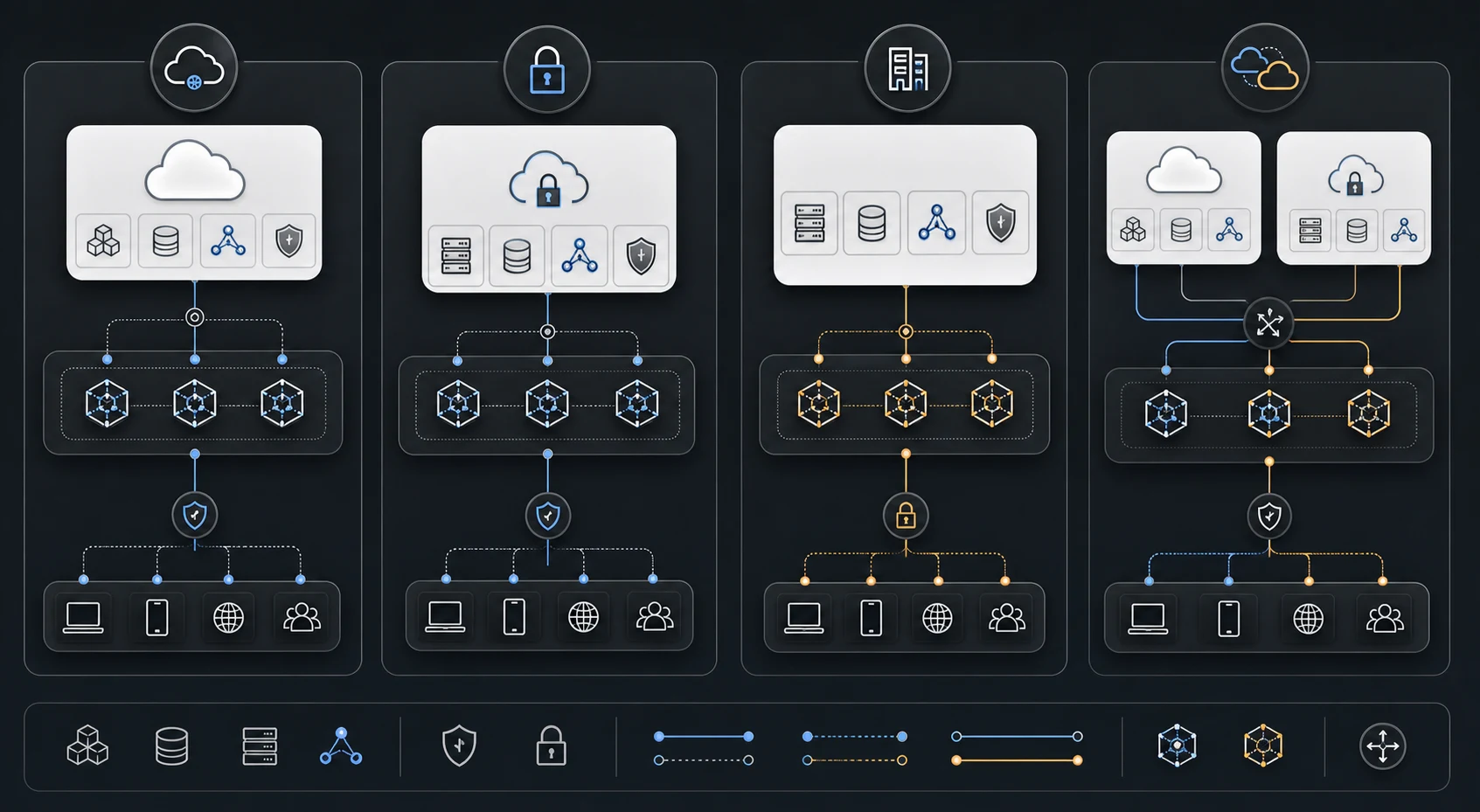
On-prem AI vs cloud AI vs private cloud vs hybrid AI
Most enterprises should not treat deployment as a binary decision. The better approach is to classify workloads and choose the right deployment path for each.
Zerve frames enterprise AI deployment as a spectrum that can include private, on-prem, air-gapped, and sovereign execution models, rather than a single default pattern. (Zerve)
| Deployment model | Best for | Watch out for |
|---|---|---|
| Public cloud AI API | Fast prototyping, frontier reasoning, low infrastructure burden | Data handling, cost visibility, vendor dependency, policy control |
| Cloud AI platform | Managed deployment, governance tooling, enterprise procurement | Platform lock-in, usage complexity, model constraints |
| Private cloud or VPC AI | Sensitive workloads needing stronger isolation and control | Operational complexity, configuration overhead |
| On-prem AI | High-control, sensitive, regulated, low-latency, or high-volume workloads | Hardware cost, model operations, talent requirements |
| Hybrid AI | Mixed workloads requiring routing across cloud, private, and on-prem paths | Requires strong governance and routing logic |
| Air-gapped AI | Defense, critical infrastructure, highly restricted environments | High operational burden and limited model update flexibility |
The strongest enterprise strategy is often hybrid. Routine internal tasks may run on smaller private models. Complex reasoning may route to frontier models when permitted. Sensitive retrieval may stay inside a private environment. High-risk responses may require human review before action.
That is why the operating layer matters.
When on-prem AI makes sense
On-prem AI is worth considering when the business case is driven by control, not fashion.
1. Sensitive data cannot leave the environment
If prompts, documents, customer records, engineering files, legal data, health data, financial data, source code, or internal strategy cannot safely leave the enterprise environment, on-prem or private deployment becomes more attractive.
This does not mean every sensitive workflow must use a fully self-hosted model. Sometimes the right answer is private retrieval with controlled context, redaction, strict logging, and selective routing. But if the data boundary is non-negotiable, on-prem AI deserves serious evaluation.
2. Data residency or sovereignty requirements matter
Some organizations need to keep data inside a country, region, customer-controlled facility, or disconnected environment. This is common in government, defense, finance, healthcare, telecom, critical infrastructure, and regulated manufacturing.
In these situations, the deployment model is not just a technical decision. It is part of the compliance and risk architecture.
3. Latency needs to be predictable
Cloud AI APIs are powerful, but network hops, shared infrastructure, rate limits, and provider-side variability can affect latency.
On-prem AI can be useful when the AI system sits close to the application, data source, factory floor, contact center, or edge environment. This matters for real-time workflows, high-frequency internal automation, and environments where internet connectivity is unreliable.
4. Workload volume is high enough to justify dedicated infrastructure
For low-volume AI usage, on-prem infrastructure can be overkill. For high-volume, repetitive workloads, private or on-prem inference may become more attractive because the organization can optimize models, batching, caching, and serving capacity around known patterns.
Examples include:
- document classification
- internal knowledge search
- support summarization
- compliance review assistance
- code analysis
- batch content transformation
- field-service assistant workflows
- manufacturing quality workflows
The key is not just volume. The key is stable volume with measurable value.
5. The enterprise needs stronger governance and auditability
On-prem AI can improve control, but only if governance is designed into the system.
A private model without access control, logging, monitoring, policy enforcement, or review paths can still create risk. The model may be local, but the operating process can still be unmanaged.
This is where many on-prem AI projects fail. Teams focus on hosting the model but underinvest in the control layer around it.
When on-prem AI is the wrong choice
On-prem AI is not always the mature choice. Sometimes it is simply an expensive way to recreate a weaker version of what a cloud provider already offers.
Avoid defaulting to on-prem AI when:
- the workload is still experimental
- usage volume is low or uncertain
- data is not sensitive
- latency is not a major concern
- the team lacks infrastructure ownership
- model quality needs the latest frontier reasoning
- the organization has no monitoring or governance process
- business value has not been validated
On-prem AI should not be chosen because "private sounds safer." It should be chosen because a specific workload requires control, privacy, latency, residency, cost predictability, or operational independence that a cloud-only path cannot provide.
The architecture of an enterprise on-prem AI solution
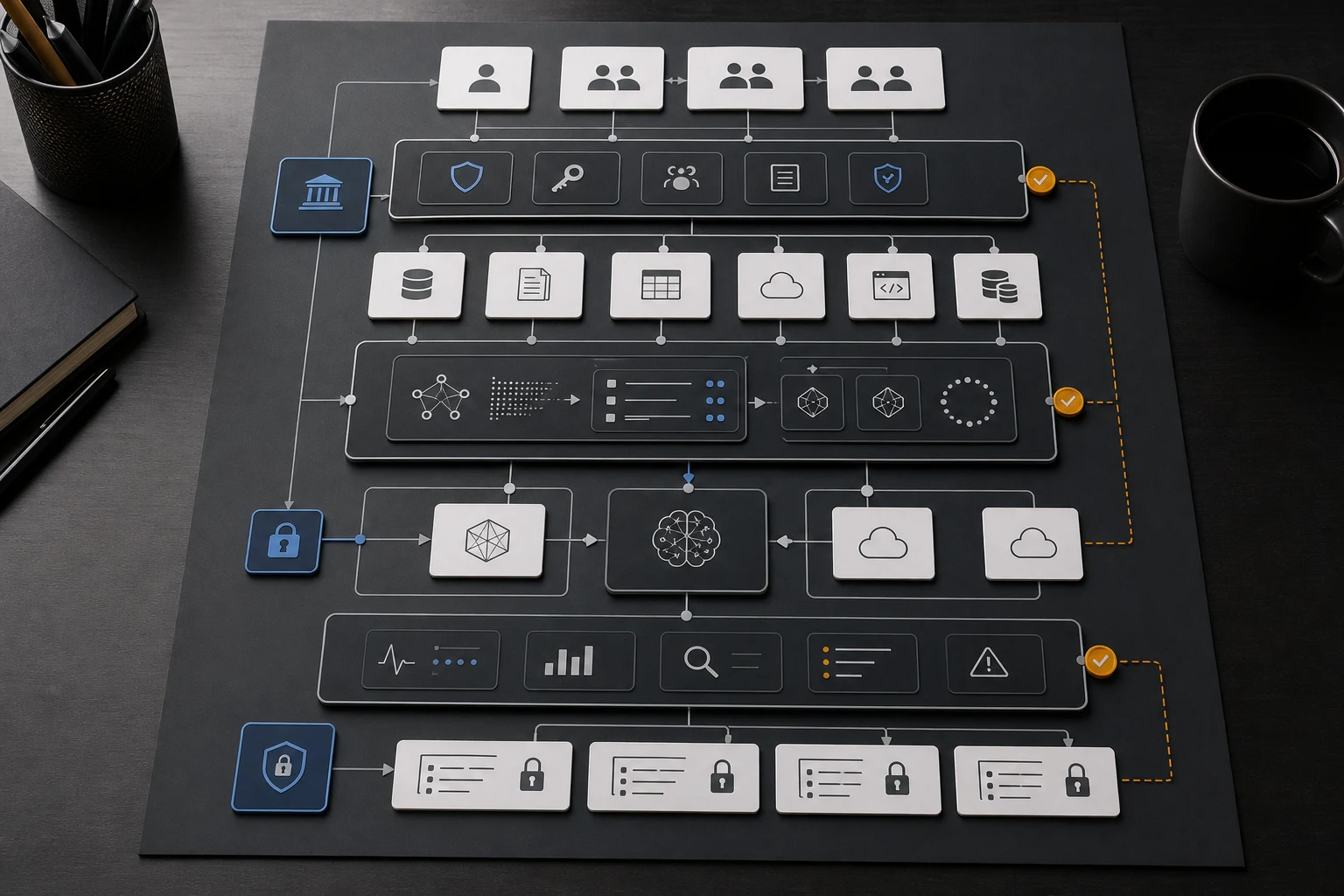
A production-grade on-prem AI solution usually needs more than model hosting. It needs an operating architecture.
AWS describes Outposts as extending AWS infrastructure, services, APIs, and tools to customer premises with local compute and storage. NVIDIA NIM positions inference microservices as deployable across cloud, data center, and GPU workstations. Red Hat OpenShift AI describes a hybrid-cloud operating model for AI and MLOps. Together, they point to the same reality: enterprise AI infrastructure is a layered system, not a single model endpoint. (AWS Outposts) (NVIDIA NIM) (Red Hat OpenShift AI)
Here is a practical reference structure.
| Layer | What it does |
|---|---|
| Access layer | Controls who can use the AI system and from which workflow |
| Policy layer | Applies rules for data handling, model choice, review, and blocking |
| Data layer | Connects to documents, databases, applications, and enterprise systems |
| Retrieval layer | Searches approved knowledge sources using RAG or hybrid search |
| Model layer | Runs private or open models, local inference, or approved external model paths |
| Routing layer | Sends each request to the right model or deployment path |
| Inference layer | Handles serving, batching, scaling, GPU utilization, and latency |
| Observability layer | Tracks cost, latency, quality, errors, usage, drift, and security signals |
| Audit layer | Captures requests, policy decisions, data access, and outputs for review |
| Human review layer | Escalates sensitive or high-risk outputs before action |
The model is only one layer. The real system is the control surface around the model.
The role of RAG in on-prem AI
Retrieval-augmented generation, or RAG, is often the first enterprise use case for on-prem AI because companies want AI to answer questions using internal knowledge.
An on-prem RAG system may include:
- internal document connectors
- permission-aware retrieval
- chunking and indexing
- embeddings
- vector or hybrid search
- reranking
- prompt assembly
- citation generation
- answer evaluation
- feedback loops
But RAG does not become safe just because it runs on-prem.
Poorly designed RAG can still expose sensitive documents, retrieve stale information, generate weak answers, or give users confidence in the wrong response. The system needs permission filtering, source freshness, evaluation, audit logs, and monitoring.
A useful rule:
On-prem RAG protects where the data runs. Governance protects how the data is used.
Both are needed. For the retrieval-specific side of that work, the enterprise RAG implementation guide goes deeper into indexing, permission filters, evaluation, and production readiness.
The model routing problem
Most enterprises should not run every AI request through the same model.
Some requests are simple. Some require deep reasoning. Some involve sensitive data. Some need low latency. Some need a stronger model even if it costs more. Some should never go to an external API. Some should be reviewed by a human before completion.
That is why model routing is central to on-prem AI.
A routing strategy may consider:
- data sensitivity
- user role
- task type
- expected quality threshold
- latency requirement
- cost limit
- model availability
- compliance requirement
- retrieval source
- business impact
- need for human review
Example routing logic:
| Workload | Likely best path |
|---|---|
| Internal FAQ over approved documents | Private RAG with smaller model |
| Legal contract review | Private model or approved frontier model with human review |
| Low-risk brainstorming | Cloud frontier model |
| High-volume document classification | On-prem private model |
| Customer-facing answer generation | RAG plus guardrails plus review or escalation |
| Sensitive HR policy query | Permission-aware private RAG |
| Code explanation for internal repositories | Private or VPC-hosted model with repository controls |
| Complex executive analysis | Hybrid path with approved frontier model and redacted context |
This is the practical middle path. Use on-prem where it creates control. Use cloud where it creates quality or speed. Use routing to avoid one-size-fits-all AI.
Cost: what enterprises often miss
The cost of on-prem AI is not just GPUs.
A realistic cost model includes:
- hardware
- GPU utilization
- inference runtime
- storage
- networking
- data pipelines
- vector database or search infrastructure
- model maintenance
- security review
- monitoring
- engineering time
- MLOps and LLMOps tooling
- electricity and cooling
- capacity planning
- support
- model updates
- fallback infrastructure
Cloud AI can look expensive at scale, especially when prompts are oversized, retrieval is inefficient, or frontier models are used for routine tasks. On-prem AI can look cheaper per request at high volume, but only if utilization is high and operations are mature.
The better question is not "which is cheaper?" It is:
Which deployment path gives the best cost, quality, latency, privacy, and governance tradeoff for this workload?
That answer should come from benchmarking, not assumptions. That is the role of the Model Benchmarking Assessment: compare cloud, private, open, RAG, and on-prem paths against actual workloads instead of using architecture preference as a proxy for ROI.
Security and governance considerations
On-prem AI can reduce exposure to third-party model providers, but it does not remove AI risk.
Enterprises still need to manage:
- prompt injection
- sensitive information disclosure
- excessive agency
- insecure tool use
- unauthorized retrieval
- weak role permissions
- unlogged actions
- model drift
- stale knowledge
- data poisoning
- insecure plugins and connectors
- output misuse
The NIST AI Risk Management Framework and the Generative AI security guidance from OWASP both reinforce that deployment location is only one part of safe AI operations. Teams still need structured risk management, access design, evaluation, and incident response. ISO/IEC 42001 adds a management-system view for governing AI over time. (NIST AI RMF) (OWASP Prompt Injection) (OWASP Sensitive Information Disclosure) (ISO 42001)
Security teams should evaluate the AI system as an application, data system, and operating workflow. The deployment location matters, but so do controls, policies, access paths, logging, monitoring, and response procedures.
A good on-prem AI architecture should answer:
- Who can access the system?
- Which data sources can each user retrieve from?
- Which prompts and outputs are logged?
- Which requests are blocked or reviewed?
- Which model handled the request?
- Which context was used?
- Was sensitive information included?
- What happens when the model fails?
- How are updates tested?
- How are incidents investigated?
If those questions cannot be answered, the system is not enterprise-ready.
A decision framework for on-prem AI
Use this framework before committing to on-prem AI.
Step 1: Classify workloads
Group AI use cases by:
- business value
- data sensitivity
- usage volume
- latency requirement
- quality requirement
- compliance need
- review requirement
- integration complexity
Step 2: Benchmark model paths
Test real workloads against:
- frontier model APIs
- cloud AI platforms
- private and open models
- on-prem inference
- RAG-enhanced paths
- hybrid paths
Measure cost, quality, latency, privacy fit, and operational complexity.
Step 3: Choose deployment path by workload
Do not choose one deployment path for the whole company. Choose per workload.
Some workflows may need on-prem. Some may work better in private cloud. Some may safely use external APIs. Some may need hybrid routing.
Step 4: Design governance before rollout
Define policies before adoption spreads.
Include:
- identity and access rules
- data handling policy
- approved model paths
- blocked use cases
- review requirements
- logging standards
- cost limits
- escalation paths
Step 5: Operate continuously
On-prem AI does not end at deployment.
Teams need to monitor:
- latency
- throughput
- GPU utilization
- model quality
- hallucination patterns
- retrieval quality
- cost per task
- user adoption
- policy violations
- drift
- model updates
AI systems change. Models change. Usage changes. Business requirements change. The operating layer has to keep up.
Where AgenixCore fits
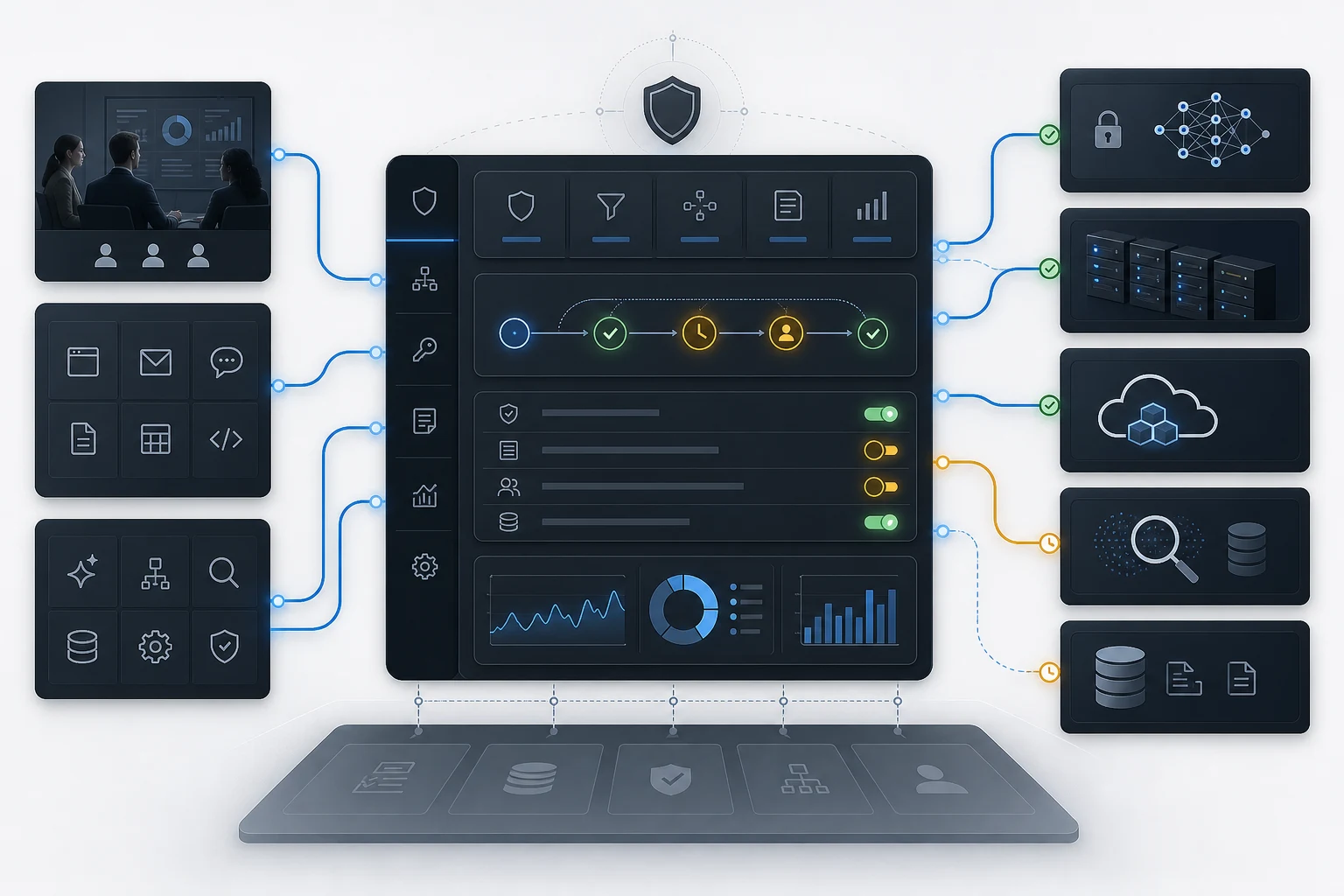
AgenixCore AI control plane is AgenixHub's operating layer for private, governed enterprise AI.
For on-prem AI, the important point is this: hosting a model privately does not automatically govern enterprise AI usage. Companies still need a layer that controls access, routes requests, handles secure context, manages cost, and captures audit logs across people, applications, agents, APIs, models, tools, and enterprise data.
AgenixCore is designed for that operating-layer problem.
In an on-prem or hybrid AI architecture, AgenixCore can sit between enterprise AI demand and the available model and data paths:
- users
- internal applications
- AI agents
- APIs
- cloud model providers
- private models
- on-prem inference
- RAG systems
- enterprise data sources
- review workflows
The goal is not to force every workload into on-prem AI. The goal is to decide, govern, and route each workload correctly.
That is what makes on-prem AI practical at enterprise scale.
How AgenixHub helps with on-prem AI solutions
AgenixHub helps companies move from uncontrolled AI usage to managed AI operations.
For on-prem AI, the typical work starts with classification and benchmarking:
- Map AI workloads
Identify which teams, tools, data sources, and workflows are using or planning to use AI. - Classify sensitivity and value
Separate routine, sensitive, high-volume, regulated, customer-facing, and complex reasoning tasks. - Benchmark model and deployment paths
Compare cloud, frontier, private, open, RAG, and on-prem paths against real workloads. - Design the AI operating layer
Define routing, access, context controls, cost limits, audit logs, and review paths. - Deploy private or on-prem models where suitable
Use on-prem only where it creates meaningful control, privacy, latency, or cost advantage. - Operate continuously
Monitor cost, quality, latency, privacy, usage, and model performance over time.
This approach avoids the two common extremes: sending everything to cloud models without control, or moving everything on-prem without a clear business case.
The visible service spine for that work is already live across the site:
- AI Operating Efficiency capabilities
- Managed AI Efficiency Layer
- Managed AI Operations
- Inward Deployed AI Engineers
- AI Operating Efficiency Audit
Practical examples
Example 1: Financial services document review
A financial services company wants AI to help analysts review internal policies, transaction notes, and customer case documents.
A cloud-only model may create data handling concerns. A fully on-prem model may not deliver enough reasoning quality for complex analysis.
A better architecture may use private RAG, on-prem retrieval, policy filtering, and selective routing. Routine classification can run privately. Complex reasoning can go through an approved model path only when sensitive context is redacted or contained.
Example 2: Manufacturing quality assistant
A manufacturer wants AI to help plant teams diagnose equipment issues using manuals, maintenance logs, and inspection notes.
On-prem or edge deployment may make sense if latency, connectivity, or plant-level data boundaries matter. The model does not need to be the strongest frontier model for every request. It needs reliable retrieval, fast responses, and strong integration with approved internal knowledge.
Example 3: Enterprise knowledge search
A large company wants employees to query HR policies, sales enablement content, engineering documents, and legal templates.
This is not one AI workload. It is many workloads with different permissions. HR documents, legal templates, and public sales collateral should not all follow the same retrieval policy.
The right system needs permission-aware RAG, identity controls, routing logic, logging, and review paths.
If the broader question is still whether to build, buy, or compose these paths, the companion guide on custom AI vs off-the-shelf AI is the right comparison.
On-prem AI implementation checklist
Before deploying on-prem AI, answer these questions:
Business fit
- Which workflows justify on-prem deployment?
- What business outcome will improve?
- What is the expected usage volume?
- What quality threshold is required?
- What happens if the answer is wrong?
Data and privacy
- What data will the AI access?
- Can data leave the environment?
- Are there residency or sovereignty requirements?
- Which users can access which sources?
- How will sensitive data be detected or restricted?
Model and infrastructure
- Which models will be tested?
- What inference runtime will be used?
- What hardware is required?
- How will capacity be planned?
- What fallback path exists if local inference fails?
RAG and context
- Which sources should be indexed?
- How will permissions be enforced?
- How will stale content be handled?
- How will retrieval quality be measured?
- How much context is necessary?
Governance and operations
- Who owns the system?
- Who reviews risky outputs?
- What is logged?
- What is blocked?
- What is monitored?
- How are model updates tested?
- How are incidents handled?
Limitations of on-prem AI
On-prem AI improves control, but it is not magic.
It may add infrastructure burden. It may require specialized engineering. It may reduce access to the newest frontier models. It may increase maintenance requirements. It may create false confidence if governance is weak. It may be more expensive if utilization is low.
The strongest enterprise AI strategy is not "everything on-prem." It is:
Run each workload on the safest, most efficient, highest-fit path, and govern the whole system through a common operating layer.
Build the right private, hybrid, or on-prem AI path
AgenixHub helps enterprises classify AI workloads, benchmark model paths, deploy private or on-prem models where suitable, and govern requests through AgenixCore.
FAQ
What are on-prem AI solutions?
On-prem AI solutions are AI systems deployed inside an organization's own infrastructure or controlled environment. They may include private LLMs, inference servers, RAG systems, vector databases, access controls, monitoring, and audit logs.
Is on-prem AI better than cloud AI?
Not always. On-prem AI can improve control, data privacy, latency, and residency, but cloud AI may offer faster deployment, better frontier-model access, and lower operational burden. The right choice depends on the workload.
When should an enterprise use on-prem AI?
Enterprises should consider on-prem AI when workloads involve sensitive data, regulatory constraints, high-volume inference, low-latency requirements, data residency needs, or environments where cloud connectivity is limited or unacceptable.
Is on-prem AI cheaper?
It can be cheaper for high-volume, stable workloads if infrastructure utilization is high and operations are mature. But it can be more expensive for low-volume or experimental workloads because hardware, engineering, monitoring, and maintenance costs are significant.
What is the difference between private AI and on-prem AI?
Private AI is a broader concept. It can run in a private cloud, VPC, dedicated environment, or on-prem infrastructure. On-prem AI specifically means the AI system runs inside infrastructure controlled by the organization, such as its own data center or local environment.
Do on-prem AI systems still need governance?
Yes. On-prem deployment controls where the system runs. Governance controls who can use it, what data it can access, which model path is allowed, what gets logged, what gets reviewed, and how risk is managed.
How does AgenixCore help with on-prem AI?
AgenixCore provides an AI control plane for private, governed enterprise AI. It helps govern access, route requests, manage secure context, control cost, and capture audit logs across users, applications, agents, models, tools, and enterprise data.
Should every enterprise move AI on-prem?
No. Most enterprises need a hybrid strategy. Some workloads should run on-prem or privately. Others may safely use cloud models or frontier APIs. The goal is to route each workload to the right path based on cost, quality, latency, privacy, and governance needs.
Conclusion
On-prem AI solutions are becoming more important because enterprise AI is moving beyond experimentation. Once AI touches sensitive data, internal systems, regulated workflows, customer-facing processes, or high-volume operations, deployment control starts to matter.
But the winning strategy is not simply to buy GPUs and host a model.
The winning strategy is to classify workloads, benchmark model paths, decide where private or on-prem deployment is actually justified, govern access and context, route requests intelligently, and operate the system continuously.
For companies building serious private, hybrid, or on-prem AI systems, AgenixCore gives the operating layer: access governance, model routing, secure context, cost controls, and audit visibility across AI workflows.
On-prem AI gives you control over where AI runs. AgenixCore helps control how enterprise AI works.